


FOX News - Daily Breaking News
3.095.61K Reviews
App Specs
- Version
- Varies with Device
- Updated On
- License
- Free
- Downloads
- 10,000,000+
- Developer
- FOX News Network, LLC
- Categories
- News & Magazines
- Platform
- Android, iOS
Screenshots

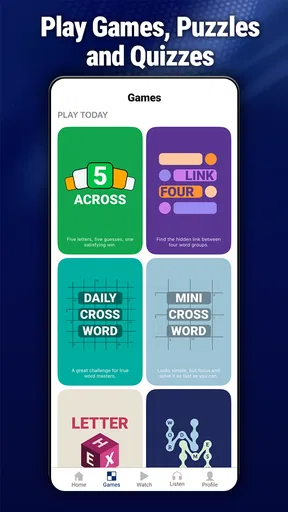





 Analysis by AppCompare
When I decide whether a news app deserves a place on my phone, I look past the headline feed: I want a clear way to follow a developing story, enough context to understand it, and a sensible balance between alerts and quiet. Fox News - Daily Breaking News is a free news and magazines app from FOX News Network, LLC, built around news coverage and live viewing. Its focus makes it a useful choice for people who already turn to Fox for reporting, but it also matters if you want a broader mix of outlets or a less video-led routine.
What to weigh before making it your daily news app
The first decision is not whether the app has news; it is whether this particular source and presentation fit how you use news. If you follow US politics and want to watch coverage as events unfold, a live-oriented experience can be more useful than a collection of short headlines. If you mostly need a quick, varied scan of local, national, and international reporting from different editorial perspectives, a general news aggregator or several publishers may suit you better.
I would also think about when you normally check the news. A person who opens an app for a few minutes during breakfast may value concise reading and easy navigation. Someone who follows a hearing, election night, or a major breaking story may care more about being able to watch coverage live and return to it as the story develops. Those are different jobs, and the app’s strengths are most apparent in the second one.
A practical routine for following a developing story
One useful way to approach a live news app is to separate checking from watching. I might first scan the main screen to see what is being covered, then open a report only when I have time to give it attention. That helps keep video from turning a quick check into an unplanned long session. For a story that changes through the day, I would use the app to hear the latest coverage, then read more carefully when I need details I can revisit.
Notifications need the same restraint. If you enable alerts, choose only the subjects you genuinely want to interrupt your day for, rather than treating every headline as urgent. A breaking-news alert is most useful when it points to something you will actually open; too many interruptions can make even important notices easy to ignore. This is a practical trade-off for anyone who wants timely updates without letting a phone dictate when to pay attention.
Where a Fox-focused experience is strongest
The app’s clearest advantage is its direct connection to Fox News coverage, particularly for viewers who want to follow its live reporting or familiar shows in one place. That can make it easier to move from a headline to a video segment without searching across separate apps. If you already watch Fox, the app can work as a convenient companion when you are away from a television or want to check coverage on your phone.
It is also a reasonable fit for someone who prefers a recognizable editorial voice instead of an aggregator that mixes many publishers into one feed. That focus is a benefit when you know whose reporting you want to follow. It is also a limitation: a single publisher’s app should not be mistaken for a complete survey of all perspectives. For a more rounded understanding of a contested issue, I would compare its reporting with coverage from other established news sources rather than relying on one feed alone.
Worth Reading Before You Choose

Switching to Android Auto Means Rethinking Your Driving Routine

Google Calendar Makes a Crowded Week Easier to Manage

Baby Panda World Brings Quick Play to Modern Phones, but Its Game Library Feels Busy

ESPN’s Live Game View Makes Following Close Games Easier

QuizzLand Review: A Good Fit for Short Trivia Breaks, Not Every Player

Basketball Stars: Multiplayer Is Fast, but Can It Recover When Matches Go Wrong?
When another kind of news app may work better
News aggregators are often the better starting point for readers who want to compare headlines from multiple outlets in one session. A newspaper’s own app may be preferable for someone who wants that publication’s reporting and long-form work as the center of the experience. Public radio or audio-focused services can make more sense for people who listen while commuting and rarely watch video. These alternatives serve different habits; none is automatically better for everyone.
I would skip this app as my only news source if I wanted a deliberately wide range of editorial viewpoints in a single place. I would also look elsewhere if I rarely watch news video and mainly want a compact reading list, or if a stream of breaking coverage makes it harder for me to step away. The useful question is not whether live news is appealing in general, but whether it fits the way I want to spend attention on news.
What switching actually involves
Trying the app does not require paying for it: it is free, and its age rating is Everyone 10+. Still, switching your daily routine has a small attention cost. You may need to decide which alerts are worth keeping on, learn where the stories you care about appear, and resist checking out of habit whenever a notification arrives. If you already use another news app, there is no reason to replace it immediately; try this one alongside it and see whether its live coverage adds something you genuinely use.
The audience figures suggest that it is an established app, with over ten million installs. Its average rating is 3.2 from around 295,000 ratings, alongside roughly 96,000 written reviews. I would treat those numbers as context rather than a verdict: people can rate a news app for its interface, technical performance, or editorial point of view, which are quite different judgments. My own decision would come down to whether the coverage style and viewing options suit my routine.
Before settling on it, I would ask myself a few practical questions. Do I want to watch news, or mostly read it? Am I comfortable making one publisher a regular part of my news diet? Will alerts help me follow important events, or will they become noise? And do I have another source to consult when I want to compare accounts? Those answers matter more than a long feature checklist because they determine whether the app is useful after the initial download.
So, I recently downloaded the Fox News - Daily Breaking News app, and let me tell you, it’s been quite the experience. Whether you’re a news junkie or just want to stay updated without too much fuss, this app might be exactly what you’re looking for.
Getting Started
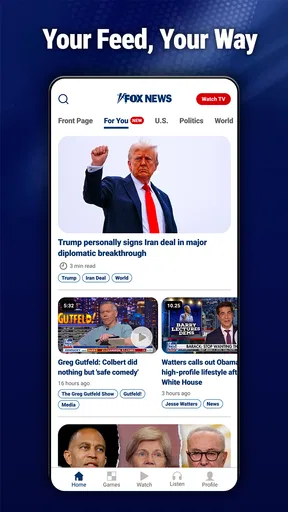
Setting up the Fox News app was a breeze. Once downloaded, it quickly gets you into the mix with a clean, intuitive interface. I was impressed by how everything is laid out so you can easily find what you need. The main screen greets you with top stories, and navigating through different sections like politics, entertainment, and sports feels natural.
Features and Functionality
Now, let’s talk functionality. The app offers live streaming, which is perfect if you want to catch up with the latest events in real time. Plus, there’s a nifty feature where you can watch clips from your favorite Fox News shows. Whether it's Tucker Carlson or The Five, you’ve got quick access.
What I really like is the customizable alerts. You can tailor notifications to suit your interests, ensuring you only get news that matters to you. This feature is a game-changer for anyone who doesn’t want to be bombarded with every headline.
User Experience
Here’s the thing about user experience: it’s seamless. I’ve yet to encounter any bugs or crashes, which is always a bonus. The app loads quickly, and scrolling through articles and videos is smooth. The articles themselves are well-written and informative, not to mention the embedded videos that provide an added layer of depth to the stories.
Another cool feature is the ability to save articles for later. Imagine you’re rushing out the door but see an interesting headline; just save it and read it when you have time. It’s little things like this that make the app user-friendly.
Why You Should Download It
If you’re someone who wants a reliable source for news on the go, this app has got you covered. Its strong suit is definitely the live streaming and video clips, which keep you engaged and informed. Plus, the customization options mean you can tailor your news diet to fit your needs.
In a world overflowing with information, having a trusted source that’s easy to navigate can be a relief. The app does a fantastic job of providing comprehensive news coverage without overwhelming you.
In conclusion, the Fox News - Daily Breaking News app is a solid choice for staying updated with minimal effort. Whether you’re a political enthusiast or just want to know what’s happening in the world, it’s worth checking out. Happy news reading!
Pros
- User-friendly interface
- easy navigation.
- Customizable news alerts and updates.
- Wide range of news categories available.
- Access to live streaming of events.
- Offline reading mode for convenience.
Cons
- Contains ads that can be intrusive.
- Limited access without subscription.
- Occasional lag in app performance.
- Some bias in news coverage.
- Requires stable internet for live streams.
FAQs for FOX News - Daily Breaking News
What features does the Fox News app offer?
The Fox News app provides users with the latest breaking news, live video streaming, and access to exclusive content. It features customizable news alerts, live coverage of major events, and a streamlined interface for browsing articles, videos, and opinion pieces. Users can also listen to Fox News Radio directly through the app.
Is the Fox News app free to download and use?
Yes, the Fox News app is free to download on both Android and iOS platforms. While the app offers a wide range of free content, some features may require a cable subscription login for full access to live streaming and certain exclusive videos. However, most news articles and updates are available without any cost.
How can I customize news alerts in the Fox News app?
To customize news alerts, open the app and navigate to the settings menu. From there, you can choose which topics or categories you'd like to receive notifications for. You can also adjust the frequency and type of alerts, ensuring you only receive updates that are most relevant to your interests.
Does the app provide international news coverage?
Yes, the Fox News app covers international news alongside U.S. headlines. Users can explore a variety of global news topics, including politics, economy, and cultural events. The app's interface allows you to easily switch between domestic and international news sections, keeping you informed on global developments.
Is there a way to share news articles from the app?
Absolutely. The Fox News app allows users to share articles and videos directly through social media platforms, email, or messaging apps. Simply open the article you wish to share, tap the share icon, and choose your preferred method to spread the news with your friends and family.


